
How to Block and Mute in Marvel Rivals
by Jack
Feb 14,2025
Quick Links
Marvel Rivals offers a fresh take on the hero shooter genre, distinguishing itself from similar titles like Overwatch. Despite a successful launch, some players encounter frustrating interactions.
One common issue involves undesirable communication from other players. While reporting remains an option for serious offenses, muting or blocking players provides immediate solutions for managing in-game experiences. This guide details how to block and mute players in Marvel Rivals, along with additional helpful tips.
How to Block Players in Marvel Rivals
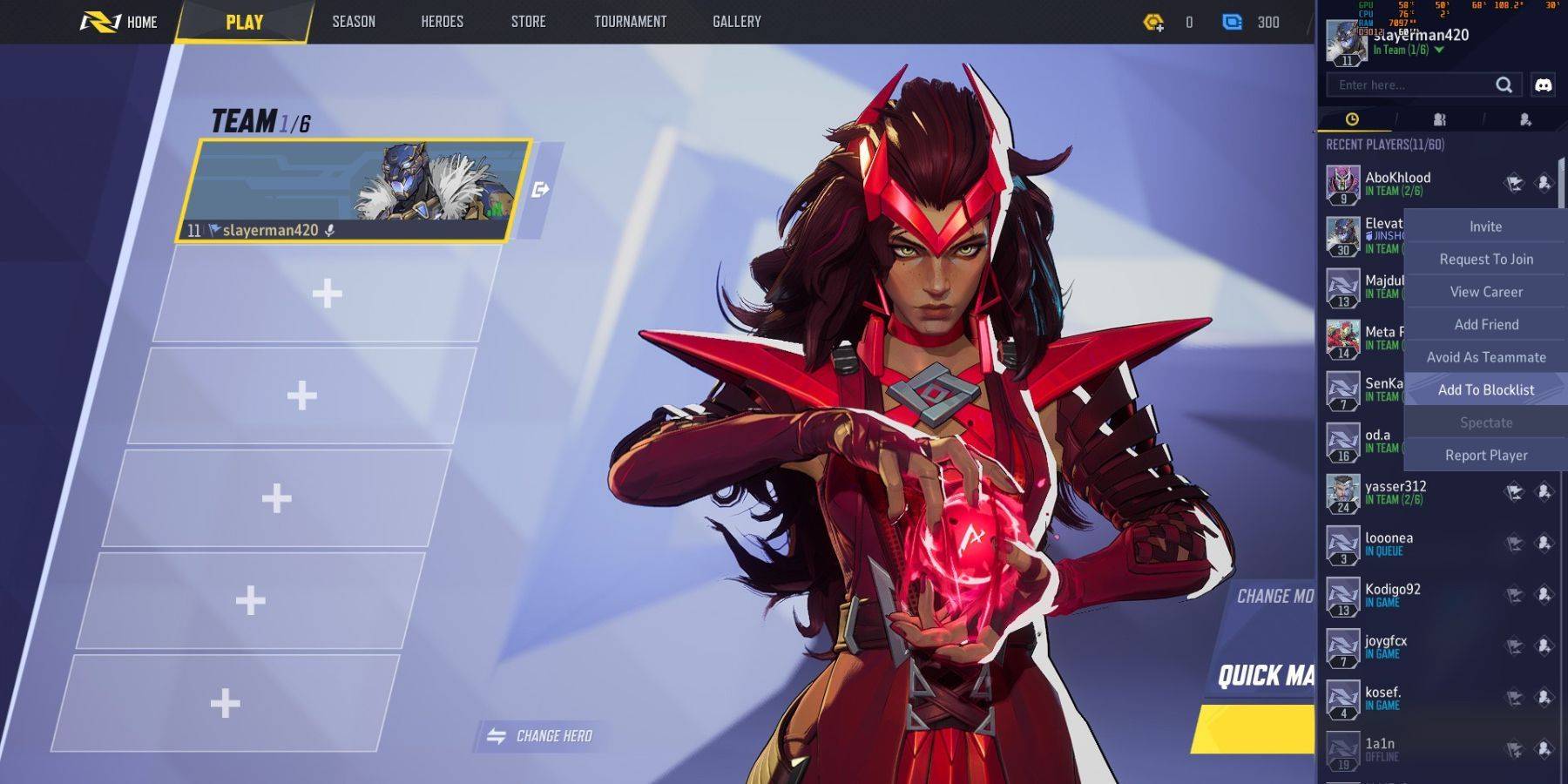 Dealing with uncooperative teammates in Marvel Rivals? Blocking them prevents future matches together. Here's how:
- Navigate to the Marvel Rivals main menu.
- Access the Friends list.
- Select "Recent Players."
- Find the player you wish to block and select their profile.
- Choose "Avoid as Teammate" or "Add to Blocklist."








![Roblox Forsaken Characters Tier List [UPDATED] (2025)](https://img.actcv.com/uploads/18/17380116246797f3e8a8a39.jpg)


- 1 Silent Hill 2 Remake Confirms Xbox, Switch Release in 2025 Feb 08,2025
- 2 Connect Asus ROG Ally to TV or Monitor: Easy Guide Apr 06,2025
- 3 Fix 'Can't Connect to Host' Error in Ready or Not: Quick Solutions Jun 13,2025
- 4 The Best Free Comic Book Sites and Apps in 2025 Mar 18,2025
- 5 Dragon Soul Tier List: Ultimate Guide May 12,2025
- 6 "Persona Games and Spin-Offs: Complete Chronological List" Apr 09,2025
- 7 How to Run JioHotstar on PC with BlueStacks Feb 28,2025
- 8 Assassin's Creed Shadows: Max Level and Rank Cap Revealed Mar 27,2025





-
Top Arcade Classics and New Hits
A total of 10
-
Addictive Arcade Games for Mobile
A total of 10
-
Android Apps for Video Content Creation
A total of 10









