
How To Use Legacy XP Tokens in Black Ops 6
The return of the classic Call of Duty Prestige system in Black Ops 6 has made XP grinding more popular than ever. Players familiar with recent CoD titles like Modern Warfare 3 and Warzone might have a head start. This guide explains how to utilize Legacy XP Tokens in Black Ops 6.
Understanding Legacy XP Tokens in Black Ops 6
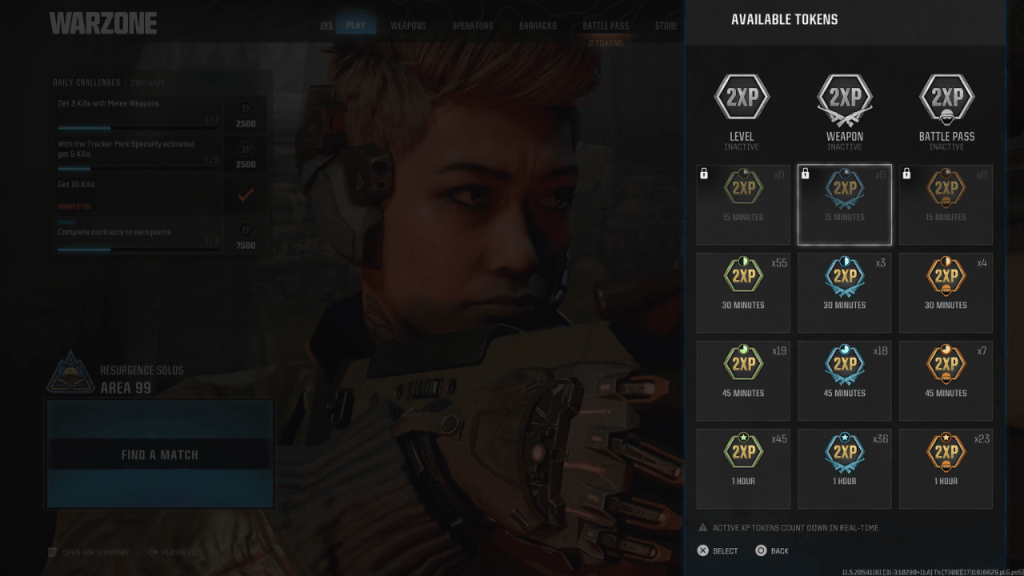 Following the Season 01 update to Black Ops 6 and Warzone, many players discovered a surplus of previously unseen XP tokens in Black Ops 6. While initially usable for boosting XP, Weapon XP, and Battle Pass progression, a November 15th update addressed an issue preventing their activation within the Black Ops 6 interface, according to the Call of Duty Blog.
These Legacy XP Tokens are leftover, unused tokens carried over from previous CoD titles accessible via the COD HQ app, such as Modern Warfare II, Modern Warfare III, or Warzone. These games offered various ways to earn XP tokens, including DMZ Missions, Battle Pass Tiers, and promotions with brands like Little Caesar's and Monster Energy. Any tokens acquired through these or similar methods remain usable in Warzone. Here's how to utilize them in Black Ops 6.
Related: Troubleshooting the Ghost Locked Glitch in Black Ops 6
Using Warzone XP Tokens in Black Ops 6
At the launch of Season 01, players could directly activate their Warzone Legacy XP Tokens within Black Ops 6. However, this was temporarily disabled. A workaround existed, allowing players to leverage these tokens to accelerate XP, Weapon XP, and Battle Pass progression in Black Ops 6.
The method involved activating the Legacy XP Tokens in Warzone. Once activated, the token and its timer would appear in the Black Ops 6 UI. While requiring switching between games, this workaround provided a faster leveling path in Black Ops 6. Keep in mind that XP token timers count down in real time.
Call of Duty: Black Ops 6 and Warzone are currently available on PlayStation, Xbox, and PC.







![Roblox Forsaken Characters Tier List [UPDATED] (2025)](https://img.actcv.com/uploads/18/17380116246797f3e8a8a39.jpg)


- 1 Silent Hill 2 Remake Confirms Xbox, Switch Release in 2025 Feb 08,2025
- 2 Fix 'Can't Connect to Host' Error in Ready or Not: Quick Solutions Jun 13,2025
- 3 Dragon Soul Tier List: Ultimate Guide May 12,2025
- 4 The Best Free Comic Book Sites and Apps in 2025 Mar 18,2025
- 5 Connect Asus ROG Ally to TV or Monitor: Easy Guide Apr 06,2025
- 6 How to Run JioHotstar on PC with BlueStacks Feb 28,2025
- 7 Assassin's Creed Shadows: Max Level and Rank Cap Revealed Mar 27,2025
- 8 "Persona Games and Spin-Offs: Complete Chronological List" Apr 09,2025





-
Top Arcade Classics and New Hits
A total of 10
-
Addictive Arcade Games for Mobile
A total of 10
-
Android Apps for Video Content Creation
A total of 10









