
Best Settings for Fortnite Ballistic
Master Fortnite Ballistic with These Optimal Settings!
Fortnite, while not typically a first-person shooter, introduces Ballistic, a new game mode that changes the game. This guide highlights the best settings for maximizing your performance in this first-person perspective.
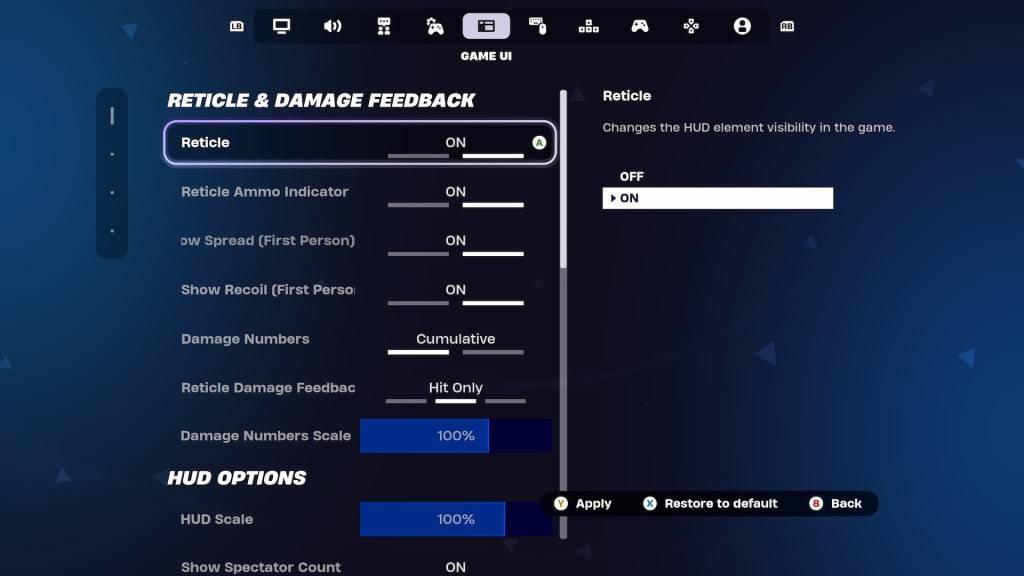
Veteran Fortnite players often have finely-tuned settings. Fortunately, Ballistic offers specific adjustments within the Game UI's Reticle & Damage Feedback tab. Let's explore the key settings and recommended configurations:
Show Spread (First Person)
This setting adjusts your reticle to reflect your weapon's spread. However, in Ballistic, hip-firing is surprisingly effective. Therefore, disabling this setting is recommended. A cleaner reticle simplifies aiming and improves headshot accuracy.
Show Recoil (First Person)
Recoil is a significant challenge in Ballistic. This setting determines whether your reticle moves with recoil. Unlike the spread setting, keeping this option enabled is crucial. Seeing the recoil helps manage it, particularly with powerful Assault Rifles where raw power compensates for reduced accuracy.
Alternatively, you can completely disable the reticle. While challenging for casual players, experienced players aiming for high-ranked scores might find this provides superior control.
These settings adjustments are key to mastering Fortnite Ballistic. For additional tips, explore how to utilize Simple Edit in Battle Royale.
Fortnite is available on various platforms, including Meta Quest 2 and 3.






![Roblox Forsaken Characters Tier List [UPDATED] (2025)](https://img.actcv.com/uploads/18/17380116246797f3e8a8a39.jpg)


- 1 Silent Hill 2 Remake Confirms Xbox, Switch Release in 2025 Feb 08,2025
- 2 Fix 'Can't Connect to Host' Error in Ready or Not: Quick Solutions Jun 13,2025
- 3 Dragon Soul Tier List: Ultimate Guide May 12,2025
- 4 The Best Free Comic Book Sites and Apps in 2025 Mar 18,2025
- 5 Connect Asus ROG Ally to TV or Monitor: Easy Guide Apr 06,2025
- 6 "Persona Games and Spin-Offs: Complete Chronological List" Apr 09,2025
- 7 How to Run JioHotstar on PC with BlueStacks Feb 28,2025
- 8 Assassin's Creed Shadows: Max Level and Rank Cap Revealed Mar 27,2025





-
Top Arcade Classics and New Hits
A total of 10
-
Addictive Arcade Games for Mobile
A total of 10
-
Android Apps for Video Content Creation
A total of 10









