
"Shiny Keldeo & Meltan Now Available in Pokemon Home"
Exciting news for *Pokemon Home* enthusiasts: with the update to version 3.2.2, you can now snag Shiny Keldeo and Shiny Meltan! But, there's a catch—you'll need to roll up your sleeves and complete some tasks to add these coveted Pokémon to your collection. While the process might be a bit demanding, the payoff is huge, especially for Shiny Keldeo, which was previously unobtainable and Shiny-locked. Once you've secured these dazzling creatures, you can transfer them to your other *Pokemon* games linked to your *Home* account.
How To Get Shiny Keldeo in Pokemon Home
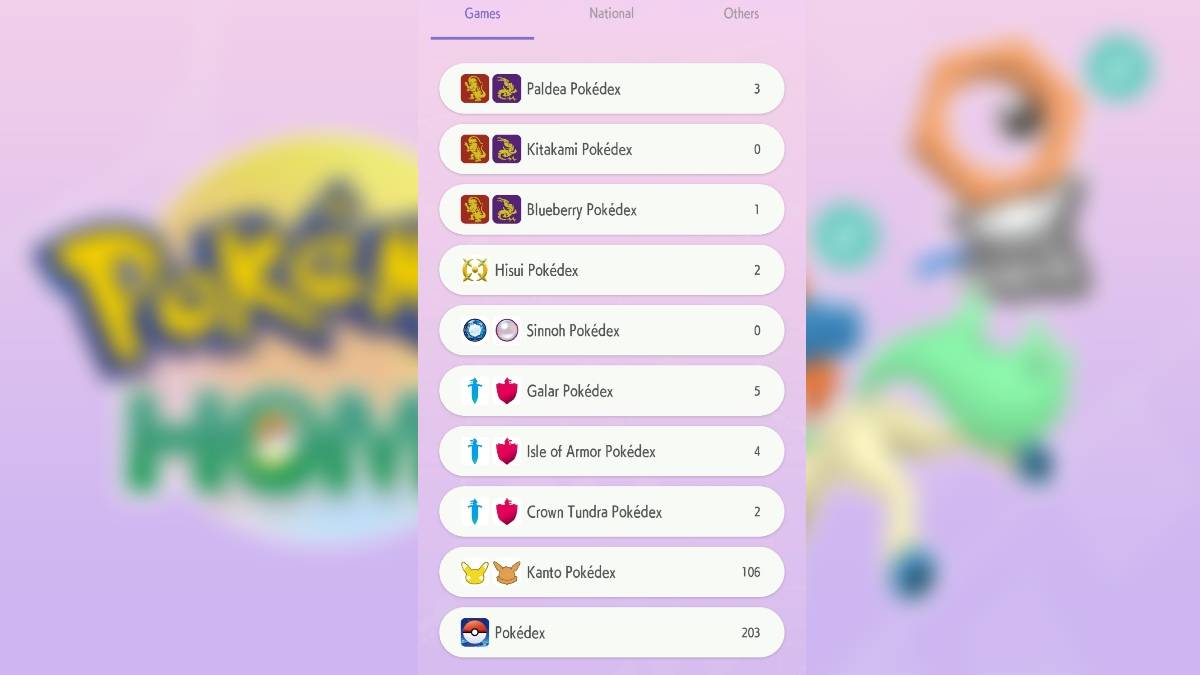
To unlock Shiny Keldeo in *Pokemon Home*, you must first conquer the Galar Pokedex. This means filling it with Pokémon from *Sword & Shield*, plus those from the Isle of Armor and Crown Tundra DLCs, each with their own Pokedex to complete. Once you've achieved this, you can claim your Shiny Keldeo via the "Mystery Gift" option, accessible from the main menu by clicking the three-line menu icon.
Remember, only Pokémon with the Galar origin mark, indicating they originated from *Sword & Shield* or its DLC, will count towards your Galar Pokedex completion. This mark is the slanted PokeBall logo, visible above the stat screen of each Pokémon. There's no rush to complete this task, as there's no deadline to claim Shiny Keldeo.
How To Get Shiny Meltan in Pokemon Home
Similarly, to get Shiny Meltan, you'll need to complete the Kanto Pokedex with Pokémon from *Let's Go Pikachu & Eevee*. These Pokémon must bear the Let's Go marker, a Pikachu silhouette above their stat screen. Once your Kanto Pokedex is complete, head to the "Mystery Gift" option on the main menu to claim your Shiny Meltan. Like Keldeo, there's no time limit to unlock and claim Shiny Meltan.
Why Is Pokemon Home Not Registering My Pokedex?
If you're facing issues with *Pokemon Home* not registering your Pokedex entries, it's likely due to a data glitch. Fortunately, this can be fixed by clearing the app's cache. Follow these steps as suggested by Pokémon's support website:
- Open the app and tap the "Menu" icon (three lines within a circle) in the top-right corner of the title screen.
- Select "Clear Cache."
- Confirm with "OK" when prompted that "None of the data you’re currently using will be deleted."
- You'll see a message confirming that the cache has been successfully cleared.
After clearing the cache, your Pokedex should start registering Pokémon correctly.
Now that you're equipped with the knowledge to secure Shiny Keldeo and Shiny Meltan in *Pokemon Home*, why not check out the best counters for Mega Tyranitar in *Pokemon GO*? And for even more rewards, don't forget to redeem the latest *Pokemon GO* promo codes for additional bonuses.










![Roblox Forsaken Characters Tier List [UPDATED] (2025)](https://img.actcv.com/uploads/18/17380116246797f3e8a8a39.jpg)


- 1 Silent Hill 2 Remake Confirms Xbox, Switch Release in 2025 Feb 08,2025
- 2 Fix 'Can't Connect to Host' Error in Ready or Not: Quick Solutions Jun 13,2025
- 3 Dragon Soul Tier List: Ultimate Guide May 12,2025
- 4 The Best Free Comic Book Sites and Apps in 2025 Mar 18,2025
- 5 Connect Asus ROG Ally to TV or Monitor: Easy Guide Apr 06,2025
- 6 "Persona Games and Spin-Offs: Complete Chronological List" Apr 09,2025
- 7 How to Run JioHotstar on PC with BlueStacks Feb 28,2025
- 8 Assassin's Creed Shadows: Max Level and Rank Cap Revealed Mar 27,2025





-
Top Arcade Classics and New Hits
A total of 10
-
Addictive Arcade Games for Mobile
A total of 10
-
Android Apps for Video Content Creation
A total of 10









