

IBM Maximo Transfers Receipts
- Productivity
- 1.0.6
- 45.00M
- Android 5.1 or later
- Apr 02,2025
- Package Name: com.ibm.iot.maximoanywhere.v2.transfers
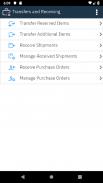
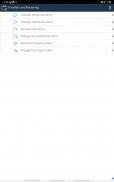
The IBM Maximo Transfers Receipts app is an essential tool designed to enhance inventory management and tracking. Compatible with IBM Maximo Anywhere 7.6.4.x and later versions, this app empowers users to seamlessly transfer inventory items or tools between storerooms within the same site or across different sites and organizations. Not only can users track the delivery of these items, but they can also create shipment receipt records to document their receipt. Additionally, the app enables users to monitor the balance of received items, adjust totals and status in the inventory usage records, and specify inspection requirements for received items. With the capability to void shipment receipt records and return items when necessary, this app provides a robust solution for efficient inventory management. Before diving in, it's advisable to reach out to your IBM Maximo Anywhere administrator. Click now to download the IBM Maximo Transfers Receipts app and optimize your inventory processes.
Features of the IBM Maximo Transfers Receipts App:
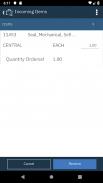
1) Inventory Maintenance and Tracking: The app offers a streamlined service for maintaining and tracking inventory items or tools. It facilitates the transfer of these items between storerooms within the same site or across different sites and organizations, ensuring seamless inventory movement.
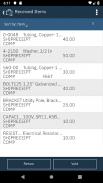
2) Shipment Receipt Logging: Users can generate shipment receipt records to document the receipt of transferred inventory items. This feature aids in maintaining a comprehensive record of delivered items and tracking their movement within the organization.
3) Monitoring and Adjusting Inventory: The app allows users to keep an eye on the balance of received items and make necessary adjustments to the totals and status in the inventory usage records. This ensures the accuracy of inventory records at all times.
4) Inspection Requirements: Users have the option to specify whether an inspection is required upon receiving inventory items. They can also indicate the inspection status for shipment receipt records, ensuring adherence to proper inspection protocols during item receipt.
5) Voiding and Returning Shipment Receipts: The app provides the flexibility to void shipment receipt records if needed. Additionally, users can return items when necessary, simplifying the management and correction of any errors or issues with received shipments.
6) Compatibility and Administrator Support: The app is compatible with IBM Maximo Anywhere 7.6.4.x and later versions, as well as versions available through the IBM Maximo Application Suite. Users are encouraged to contact their IBM Maximo Anywhere administrator before using the application to ensure proper setup and guidance.
Conclusion:
The IBM Maximo Transfers Receipts App stands out as a comprehensive solution for inventory maintenance and tracking. It offers a user-friendly interface that simplifies the process of transferring items between storerooms, logging receipt records, monitoring inventory balances, and ensuring adherence to inspection protocols. The app's features, such as voiding and returning shipments, provide the flexibility needed to manage any discrepancies or issues effectively. Its compatibility with IBM Maximo Anywhere, coupled with the support of an administrator, ensures a seamless user experience. Download the app now to streamline your inventory management processes and enhance your operational efficiency.













-
 Undecember launches massive overhaul alongside 4th anniversary festivities
Over 100 skill and link runes enhancedNew build options now available4th anniversary login rewards ready to claimIf you've been embracing the challenge of last year’s Abyss Gate update, Undecember is now introducing a fresh season within its hack-and
May 28,2026 -
 Terra Nil Heatwave Update Adds Three New Maps
Terra Nil's latest free update, "Heatwave," introduces some of the game's most severe yet visually stunning environments. Published by Devolver Digital and developed by Clockwork Acorn and Free Lives, the update is now available on mobile and Steam.H
May 28,2026 - ◇ Seven Knights ReBIRTH Equipment & Accessories Guide — Gear Up Your Heroes Smartly May 22,2026
- ◇ Clash Royale Returns with Retro Royale Mode May 20,2026
- ◇ "DELTARUNE Chapter 5 Launches in 2026" May 20,2026
- ◇ Pre-Order Skyrim Dragonborn Helmet Now at IGN Store May 20,2026
- ◇ Crystal of Atlan's Core Combat Unveiled May 18,2026
- ◇ Primrows announces official launch date to hype you up for the logic-based gardening puzzler May 18,2026
- ◇ Splatoon Raiders Preorder and DLC Details May 16,2026
- ◇ Capcom reveals Street Fighter 6 Year 3 roster May 16,2026
- ◇ The 10 Best Apocalyptic Movies May 14,2026
- ◇ Oblivion Remastered Patch Sparks Visual Issues; Bethesda Vows Swift Fix May 12,2026

![Roblox Forsaken Characters Tier List [UPDATED] (2025)](https://img.actcv.com/uploads/18/17380116246797f3e8a8a39.jpg)


- 1 Silent Hill 2 Remake Confirms Xbox, Switch Release in 2025 Feb 08,2025
- 2 Fix 'Can't Connect to Host' Error in Ready or Not: Quick Solutions Jun 13,2025
- 3 The Best Free Comic Book Sites and Apps in 2025 Mar 18,2025
- 4 Dragon Soul Tier List: Ultimate Guide May 12,2025
- 5 Connect Asus ROG Ally to TV or Monitor: Easy Guide Apr 06,2025
- 6 "Persona Games and Spin-Offs: Complete Chronological List" Apr 09,2025
- 7 Assassin's Creed Shadows: Max Level and Rank Cap Revealed Mar 27,2025
- 8 How to Run JioHotstar on PC with BlueStacks Feb 28,2025





-
Top Arcade Classics and New Hits
A total of 10
-
Addictive Arcade Games for Mobile
A total of 10
-
Android Apps for Video Content Creation
A total of 10









